




Welcome to the Social Sciences Quantitative Learning Hub (SSQLH)
The Social Sciences Quantitative Learning Hub (SSQLH) is a free drop-in support staffed by paid Peer Assistants. These undergraduate students have distinguished themselves as excellent students in economics and trained specifically to facilitate discussion and collaboration among students.- Schedule: Monday to Friday 11am - 6pm *closed Wednesdasy 12pm - 2pm (Weeks 2 - 10)
- Supports SocSci 10 and Econ Courses: 15A/15B, 20A/20B, 100A/100B/100C, 122A/122B
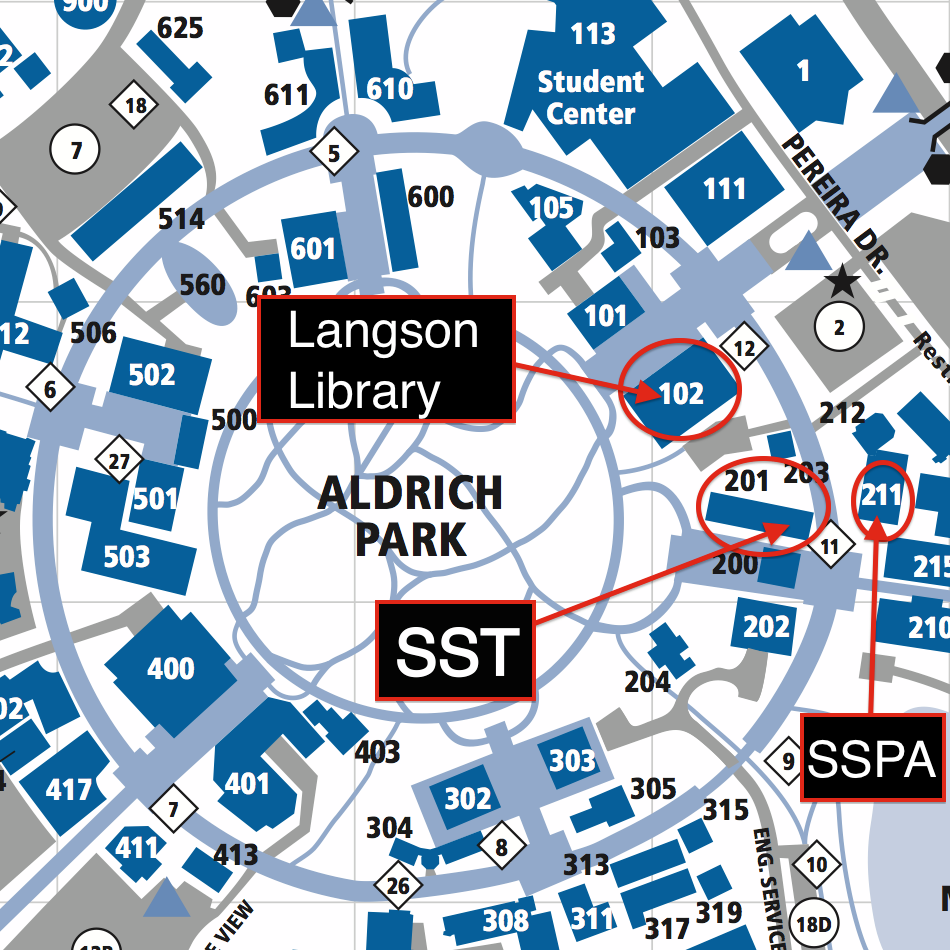
- Location: 165 Social Science Tower (SST) (How to get to SST 165 DirectionsOpens in new tab)
The SSQLH is on the first floor of the Social Science Tower (SST) directly across
from Social Science Hall.
Please contact us if you have any questions, comments or suggestions on how we can improve: econlc@uci.edu
Follow us on Instagram & meet our PAs @ucieconlc
ZotPASS – Website Check-in
Prefer Using the Website? Go to https://uci.tedu.app/student & turn on push notifications
- Select yellow ‘Find Support’ button, then select ‘Find a Tutor’
- Select your class. You’ll only see courses you are enrolled in.
- Required: Enter a description or question here
- Click ‘Continue’ to join queue.
You will receive a push notification when it’s your turn.
Once you see the push notification, you are officially checked-in
ZotPASS – App Check-in
Don’t have the app? Download UCI ZotPASS from your app store & turn on push notifications
- On App: Select ‘+’ icon, then select ‘Find a Tutor’
- Select your class. You’ll only see courses you are enrolled in.
- Required: Enter a description or question here
- Click ‘Continue’ to join queue.
You will receive a push notification when it’s your turn.
Once you see the push notification, you are officially checked-in
What To Expect At SSQLH
Before Your Arrive:
- Know which topics/assignments you’ll work on
- Bring your lecture notes/text (class attendance required to use SSQLH)
- Check-in on ZotPASS (Website or App)
- Collaborate with peers and ask questions
- Be respectful to students and staff
- Drinks in closed containers only – No Food
- Take Phone calls outside
- Keep the space clean
Seating Priority: Students seeking help have priority seating. You’re welcome to study here when space is available.